The client is on QuickBooks Desktop, not QuickBooks Online, and you need a trial balance you can actually work from.
It is a five click report. The clicks are not the hard part. The hard part is that QuickBooks Desktop will happily hand you a report that looks right and is the wrong basis, the wrong date, or missing the subaccount detail you need to map anything, and none of that is obvious until you are halfway through the return.
Here is the export, then the five settings that decide whether the file is usable.
The report
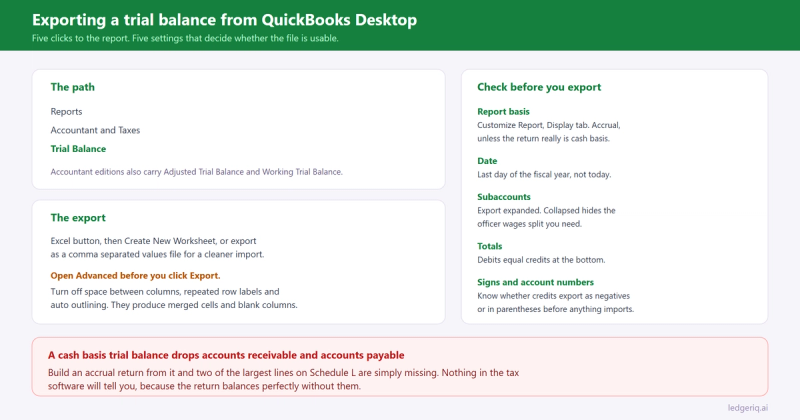
In QuickBooks Desktop, go to Reports, then Accountant and Taxes, then Trial Balance.
That is the report you want. Not the balance sheet, not the profit and loss, and not the general ledger. The trial balance gives you every account with a debit or credit balance, which is the shape a tax workpaper needs.
Accountant editions of Premier and Enterprise carry two neighbours worth knowing about in the same menu. Adjusted Trial Balance shows unadjusted balances, the adjusting entries you flagged, and the adjusted result in one report. Working Trial Balance adds a column for the adjustments you are about to make. Both are useful inside QuickBooks. Neither travels well to a spreadsheet, so for an export the plain trial balance is usually the better starting point.
Set the basis before anything else
Click Customize Report, then the Display tab.
The setting that matters most is Report Basis: Accrual or Cash. QuickBooks remembers a default per report and per user, and the default is not always what you assume.
A cash basis trial balance drops accounts receivable and accounts payable and shifts the offsets around. If you then prepare an accrual return from it, Schedule L will be missing two of its largest lines and nothing in the tax software will tell you. Run accrual, and handle the cash basis question deliberately: if the return really is cash basis, that conversion is its own piece of work, which we covered in converting cash basis books to accrual.
While you are in Display, set the date to the last day of the fiscal year, not to today. The trial balance is an as of report, so a date of 12/31 gives you the year end position. If the client's year is not a calendar year, check what the file thinks the fiscal year is, because QuickBooks is happy to run a report for a period that does not match the return.
Subaccounts: export expanded, not collapsed
The report has a Collapse button at the top. Collapsed, subaccounts roll into their parent and you get one line per parent account. Expanded, you get every account the bookkeeper actually posts to.
Export expanded. Always.
Collapsed hides exactly the detail that determines where a balance goes on the return. One Payroll Expenses parent with subaccounts for officer wages, staff wages and payroll taxes collapses into a single number, and officer compensation is a separate line on both the 1120 and the 1120S. Once it is collapsed, that split is gone and you are back to asking the client.
It also matters for the fixed asset section, where cost and accumulated depreciation are often subaccounts of the same parent and need to land on different Schedule L lines.
The export itself
With the report on screen, click the Excel button at the top of the report window.
You get two choices worth caring about. Create New Worksheet sends the report to Excel, either as a new workbook or into an existing one. That is the usual path. There is also an option to export as a comma separated values file, which is the cleaner choice if the file is going into another system, because you get data without QuickBooks formatting.
If you take the Excel route, open Advanced in the export dialog before you click Export. Turn off the cosmetic options: the blank space between columns, repeated row labels, and auto outlining. Every one of them produces merged cells, blank columns and grouped rows that a spreadsheet human can read and an import cannot.
One more thing that catches people. An Excel export of a QuickBooks report is a formatted snapshot, not a live link. Change something in QuickBooks and the workbook does not move. That is what you want for a workpaper, and it is why the export date belongs in the filename.
If you are working from an Accountant's Copy
Firms often get a client file as an Accountant's Copy rather than a full backup. The trial balance exports the same way, but two things are different and both have bitten people.
There is a dividing date. You can work in the period on or before it. The client keeps working after it. Transactions on the client side of the date are not yours to change, and some account level changes are blocked entirely.
And the file is a snapshot of the client's data at the moment they made it. If they carry on entering January transactions in the current year while you prepare last year, your trial balance is still correct for the year you are working on. What changes is the beginning balances the client sees after your changes are imported back, which is the conversation to have before they start asking why the equity moved.
Before you close the file, check these
Four checks, thirty seconds, and they save the hour.
The report totals. Debits equal credits at the bottom. If they do not, the file itself has a problem, and we wrote up how to find it in when the client's books do not balance.
The basis and date in the header. QuickBooks prints both at the top of the report. Read them rather than trusting what you set, because the report can be memorised with different settings.
Negative numbers. QuickBooks exports credit balances as negatives or in parentheses, depending on preferences. Either is fine, but you need to know which one you have before anything imports, or every liability will land on the wrong side.
Account numbers. If the client has account numbers switched on, the export includes them and they make mapping far faster. If they do not, you are matching on names, and names change between years far more often than numbers do.
Where Ledger IQ fits
Everything above gets you a file. What happens to the file is the part that takes the time.
Ledger IQ takes the Excel or CSV trial balance straight from QuickBooks Desktop, parentheses, subaccounts and all, and reads the signs rather than making you fix them. The Working Trial Balance shows debits and credits with a totals row, so a file that does not foot is visible immediately rather than after the mapping is done.
Then each account is mapped to a named tax return line, with AI suggestions you review and approve rather than a code you have to look up. Because mapping memory carries forward year over year, the second season with the same client is a review of what changed rather than a full remap, and a new subaccount appears as something to decide on instead of quietly following the parent.
Adjusting, reclassifying and tax entries live on the workpaper as numbered entries with their own descriptions, so the adjusted balances that reach the return are traceable to the unadjusted export you started with. The import file for Lacerte, UltraTax CS or Drake Tax comes out at the end, and the tie out view lets you key the as filed numbers back in to prove the return matches the workpaper.
If your client is on QuickBooks Online instead, the export steps are different, and we covered them in exporting a trial balance from QuickBooks Online.
Ledger IQ supports Forms 1065, 1120S and 1120, with exports for Drake, Lacerte and UltraTax CS. Your first return is free, so you can try it at portal.ledgeriq.ai on a live client without a credit card.