Part of our guide to Trial Balance Software for Tax Preparation: 7 Options Compared.
The trial balance is in Excel. UltraTax is open. Between them sits an hour of typing, and, at the end of it, the question of whether Schedule L balances.
That is how most business returns get prepared. This is the order that minimizes rework, the UltraTax behaviors worth understanding before you start, and the specific reasons the balance sheet refuses to tie.
Enter it in computation order, not trial balance order
A trial balance prints assets first. Entering it that way means keying the balance sheet before the return has produced the net income the balance sheet depends on, so you end up revisiting it.
Income and cost of goods sold first. Gross receipts, returns and allowances, other income. Cost of goods sold carries its own detail, beginning inventory, purchases, cost of labor, ending inventory. The ending inventory figure and the inventory line on the balance sheet are the same number. If they differ, nothing errors and the return is quietly inconsistent.
Deductions next, with two exceptions to straight typing.
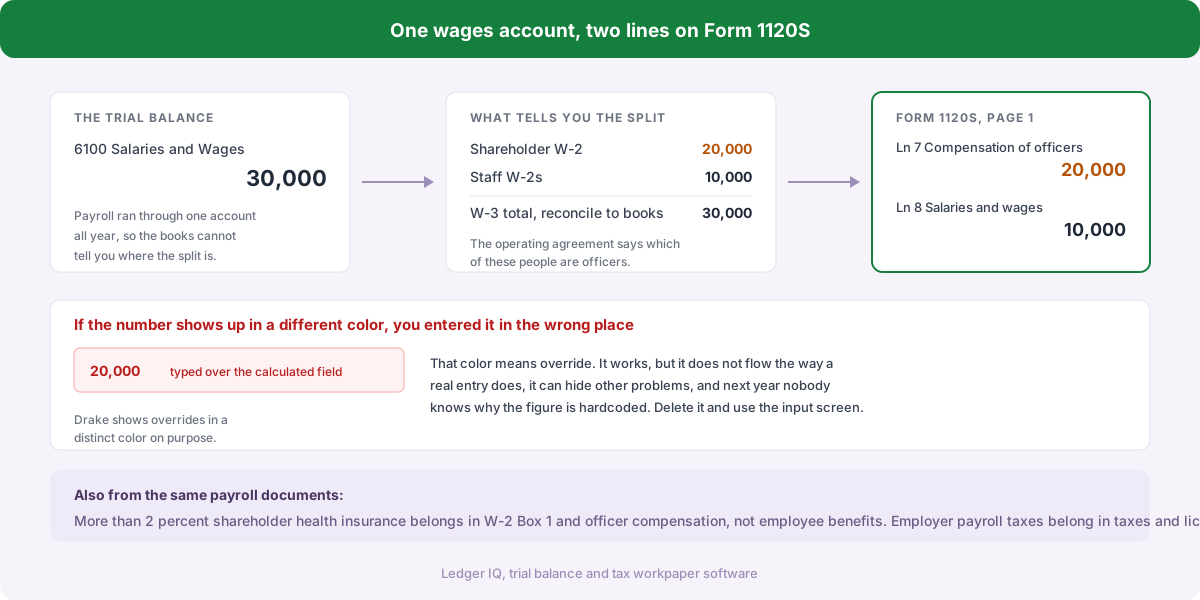
Officer compensation is reported separately from salaries and wages on a corporate return. A shareholder-employee paid through the general payroll account still has to be broken out.
Depreciation comes from UltraTax's asset module, not from the trial balance. If the assets are in the system, UltraTax computes the deduction; typing the book figure into a deduction field as well double-counts it. Enter the assets, let the module calculate, and reconcile the book-versus-tax difference on Schedule M-1.
Schedule K items next. Interest income, dividends, charitable contributions, section 179, nondeductible expenses. They leave page 1, flow to the K-1s, and affect the accumulated adjustments account, which is why they need to be in before you touch equity.
Balance sheet last, both columns.
Two UltraTax habits worth building
Watch the diagnostics as you go. UltraTax will tell you the balance sheet is out of balance, and it will tell you long before you have finished hunting for it manually. Treat the diagnostics pane as a running checklist rather than a final gate.
Verify proforma'd beginning balances instead of trusting them. Carrying a return forward brings last year's ending balances into this year's beginning column, which saves real time, and silently inherits any error in last year's return. A beginning balance that is wrong because the prior year was wrong looks exactly like a beginning balance that is right.
Why Schedule L will not balance
Nearly every out-of-balance balance sheet comes down to one of six things.
There is no beginning column. New client, or a prior return that skipped the balance sheet because the client fell under the reporting threshold. Nothing proformas, and the beginning column has to be rebuilt from the prior year's books.
[img:ultrataxL]
Beginning accumulated depreciation was omitted. Assets get entered at cost in the beginning column and the accumulated depreciation line beneath is skipped. If the prior return ended with $58,000 accumulated, you are out by exactly $58,000, a number that appears nowhere on the current trial balance, which is why re-reading the trial balance never finds it.
Retained earnings typed instead of derived. Ending equity is beginning retained earnings plus net income less distributions, and it has to agree with Schedule M-2. Entering the ending figure from the trial balance while skipping distributions makes the balance sheet impossible to tie.
Distributions skipped. They live in equity on the trial balance, never appear on page 1, and are the easiest line in the whole return to overlook. They belong on Schedule K and M-2 and they reduce ending equity.
Page 1 is incomplete. The balance sheet depends on computed net income. A missing deduction shows up as a balance sheet difference equal to that deduction, which sends you looking in the wrong place.
Rounding. Whole-dollar reporting against a trial balance with cents leaves a dollar or two.
The efficient diagnostic is arithmetic, not re-reading: take the out-of-balance amount and search the trial balance for that number, or half of it. One large difference is one missing account. A difference that equals exactly twice an account balance means a sign is reversed.
The numbers that should not be shrunk in data entry
If the client spent $8,940 on business meals, the deduction field does not get $4,470.
The full amount is the expense. The 50% disallowance is a book-to-tax difference that belongs on Schedule M-1 and, on an 1120-S, on Schedule K as a nondeductible expense, where it reduces AAA and each shareholder's stock basis. Entering half produces correct taxable income with an incorrect AAA, incorrect basis, and a K-1 that misinforms the shareholder's personal return.
Entertainment (fully nondeductible since the TCJA), officer life insurance premiums, fines and penalties, and the book-tax depreciation difference all work the same way. Reconciling items, not smaller deductions.
What the manual approach really costs
Two hundred fields per return, each one a chance to transpose a digit. A transposition inside page 1 leaves the balance sheet balanced, so nothing flags it and the return reports a number the books do not support.
And none of the thinking survives. The judgment that this client's "Occupancy Expense - Office" is rent, that "Contract Services" belongs in outside services, exists only in the preparer's memory. Next year the same trial balance arrives and the same decisions get made again, differently, if a different person makes them.
The alternative: decide once, import the file
UltraTax reads a trial balance import file, and Ledger IQ produces it.
Upload the client's trial balance in whatever format their accounting system produced. Map each account to a named return line rather than a numeric tax code, with suggestions from built-in rules, your firm's own mapping history, and AI, every suggestion reviewed before it counts toward anything. Post adjusting entries, and record book-to-tax items as tax journal entries so the meals disallowance reaches M-1 and Schedule K instead of disappearing into a halved deduction.
Then export the file UltraTax reads: account numbers assigned sequentially by section, tax codes attached for the correct entity type, credits signed correctly. In UltraTax you identify the columns once, save the mapping, and every later import for any client goes straight through the wizard.
The compounding benefit is that the mapping persists. A returning client arrives already categorized, and only new accounts need attention. Before UltraTax is even open, the Working Trial Balance has shown whether the balance sheet ties (unadjusted, adjusted and tax-basis columns with an income proof beneath them), so Schedule L becomes a confirmation instead of an investigation.
Supports Forms 1065, 1120-S and 1120. The detailed walkthrough, including the wizard settings and what to verify afterward, is in the UltraTax CS resource guide.