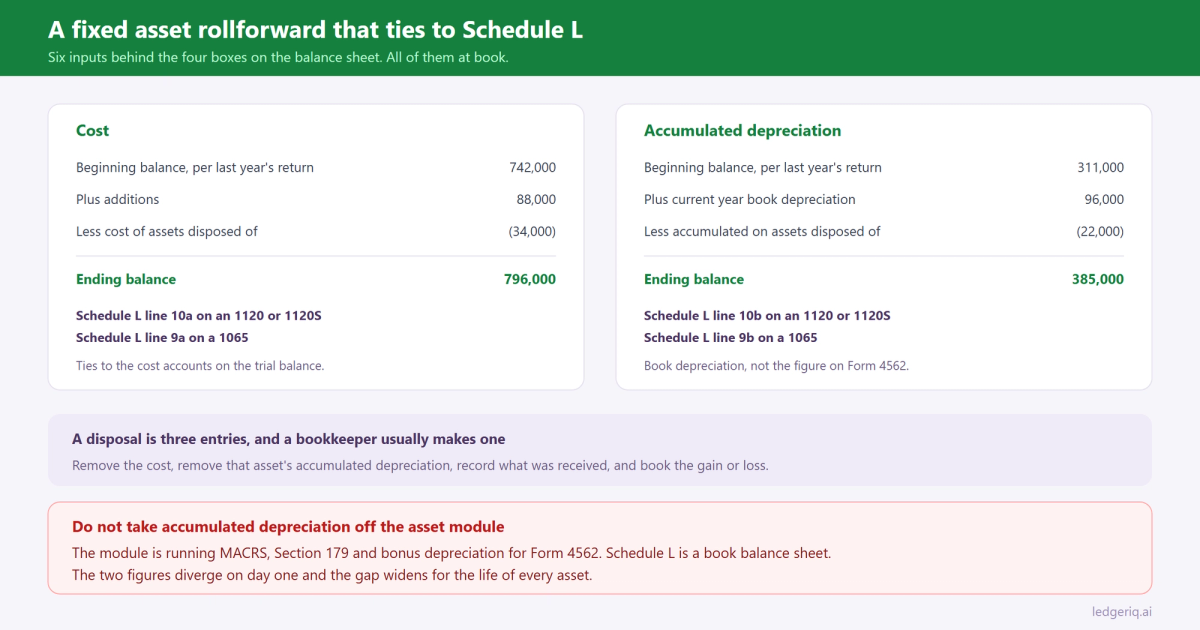
Schedule L asks for two numbers: depreciable assets at cost, and accumulated depreciation. Two lines, beginning and end of year, four boxes in total.
Behind those four boxes is a schedule with six inputs, and if you cannot produce it, you cannot prove the balance sheet. Most firms cannot produce it, which is why the asset section of Schedule L is the part that quietly stops tying somewhere around year three.
A fixed asset rollforward is not a formality. It is the workpaper that makes two of the largest numbers on the return defensible.
What the rollforward actually is
Two rollforwards, run side by side, at book.
Cost. Beginning balance, plus additions, less the cost of assets disposed of, equals the ending balance. That ending balance is Schedule L line 10a on Forms 1120 and 1120S, and line 9a on Form 1065.
Accumulated depreciation. Beginning balance, plus current year book depreciation, less the accumulated depreciation attached to the assets disposed of, equals the ending balance. That is line 10b on the corporate forms and line 9b on a 1065.
Six inputs. Every one of them should be traceable to something: an invoice, a bill of sale, a depreciation schedule, or a prior year workpaper.
The reason preparers skip it is that the tax software already carries an asset module that produces the same numbers, apparently for free. That is exactly where the problem starts.
The rollforward is book, the asset module is tax
The asset module inside Lacerte, UltraTax CS or Drake is computing MACRS, Section 179 and bonus depreciation. It is producing the number for Form 4562 and page 1 of the return.
Schedule L is a book balance sheet. It reports the client's general ledger, at book cost and book accumulated depreciation.
Those two systems diverge on day one and the gap widens for the life of every asset. Pull the accumulated depreciation total off the asset module because it was the number in front of you and the asset side of Schedule L drops by the difference, which is usually large. We walked through why the two differ and where the difference is reported in book vs tax depreciation.
So the rollforward is built from the trial balance and the client's own fixed asset detail. The asset module is a separate reconciliation, covered in how Form 4562 ties back to the trial balance.
Build it from the trial balance
Start with the accounts, not with the assets.
Pull every account in the fixed asset section of the trial balance: the cost accounts by class, and the accumulated depreciation accounts that sit against them. Put last year's ending balances in the beginning column, from last year's return rather than from the current file, because the current file may have been changed after you filed.
That first comparison does most of the work. If beginning cost per the trial balance does not equal ending cost on the prior year return, something was posted into a closed year, and you want to know that now rather than after the return is signed.
Then explain the movement. Every change between the beginning and ending balance is an addition, a disposal, or a depreciation entry. If it is none of those, it is a misposting, and a repair expensed to the wrong account is the usual culprit.
The useful discipline: additions in the rollforward should agree to what went into the asset module for the same year. Not the depreciation, the cost. If the client capitalised 88,000 of equipment and the asset module has 74,000 of additions, one of the two is missing an asset, and the tax depreciation is wrong by whatever that asset would have generated.
Disposals are where it breaks
Additions are easy. Disposals are where rollforwards go wrong, because a disposal is three entries and a bookkeeper usually makes one.
The full entry removes the asset cost, removes the accumulated depreciation attached to that specific asset, records whatever was received, and books the difference as gain or loss.
What happens instead: the client records the deposit from selling the truck as income, and nothing leaves the balance sheet. The truck is still on Schedule L at cost, its accumulated depreciation is still there, and the return reports a gain that is wrong because it was computed without reference to basis.
Two smaller versions, both common. A fully depreciated asset scrapped with no entry at all, so cost and accumulated depreciation both sit there forever, inflating both lines by the same amount and never affecting net book value. Harmless on the balance sheet, misleading in the detail, and it makes the rollforward unprovable. And a trade in, where the client records only the cash paid and the old asset never comes off.
The rollforward catches all three, because the accumulated depreciation removed on disposal has to be an amount you can point at, per asset, not a plug.
The tie points to check before it goes out
A finished rollforward should tie in four places. Check them in this order.
Ending cost equals Schedule L line 10a, or 9a on a 1065, and equals the sum of the cost accounts on the trial balance. If the trial balance and the rollforward disagree, the rollforward is missing an entry, not the other way around.
Ending accumulated depreciation equals line 10b, or 9b, and equals the sum of the accumulated depreciation accounts at book.
Current year book depreciation in the rollforward equals the depreciation expense on the income statement. Not the depreciation on Form 4562. The rollforward is a book schedule throughout.
The difference between book depreciation and the tax depreciation on Form 4562 appears on Schedule M-1. If it does not, either the M-1 is wrong or one of the two depreciation figures is not what you think it is.
A reviewer looking at the return sees four numbers on Schedule L. A reviewer looking at your file should be able to see how each of them was built in under a minute. That is the whole point of the schedule.
Where Ledger IQ fits
The rollforward is a workpaper problem, and workpapers are what Ledger IQ is.
Fixed asset accounts map to their named Schedule L lines, cost to line 10a and accumulated depreciation to line 10b, as recorded decisions on the workpaper rather than a mapping somebody remembers making. Multiple accounts can map to one line while staying itemised, so equipment, vehicles and leasehold improvements keep their identity in the detail while the line total is what reaches the return.
Year over year rollforward carries last year's balances in beside this year's, which is the beginning column of the schedule you are trying to build. An asset account that moved without an addition or a disposal to explain it shows up as a comparison rather than as something you had to think to check.
Additions, disposals and corrections go in as numbered adjusting or reclassifying entries, each with its own description, visible on the Working Trial Balance next to the unadjusted balance. The entry that removes a disposed truck at cost and its accumulated depreciation is documented as a decision, not as a movement somebody made in the client's file.
Because the tax software computes depreciation from its own asset module, Ledger IQ marks depreciation and fixed asset lines as not exported on purpose. They appear in your workpaper so Schedule L ties and so the book to tax difference is documented, and they stay out of the import file so they cannot fight the asset module.
Then the tie out view closes it. Key the as filed Schedule L amounts back in and any line that disagrees with the workpaper is flagged before the return goes out, which is the difference between finding a fixed asset problem in January and finding it in a notice.
Ledger IQ supports Forms 1065, 1120S and 1120, with exports for Drake, Lacerte and UltraTax CS. Your first return is free, so you can try it at portal.ledgeriq.ai on a live client without a credit card.