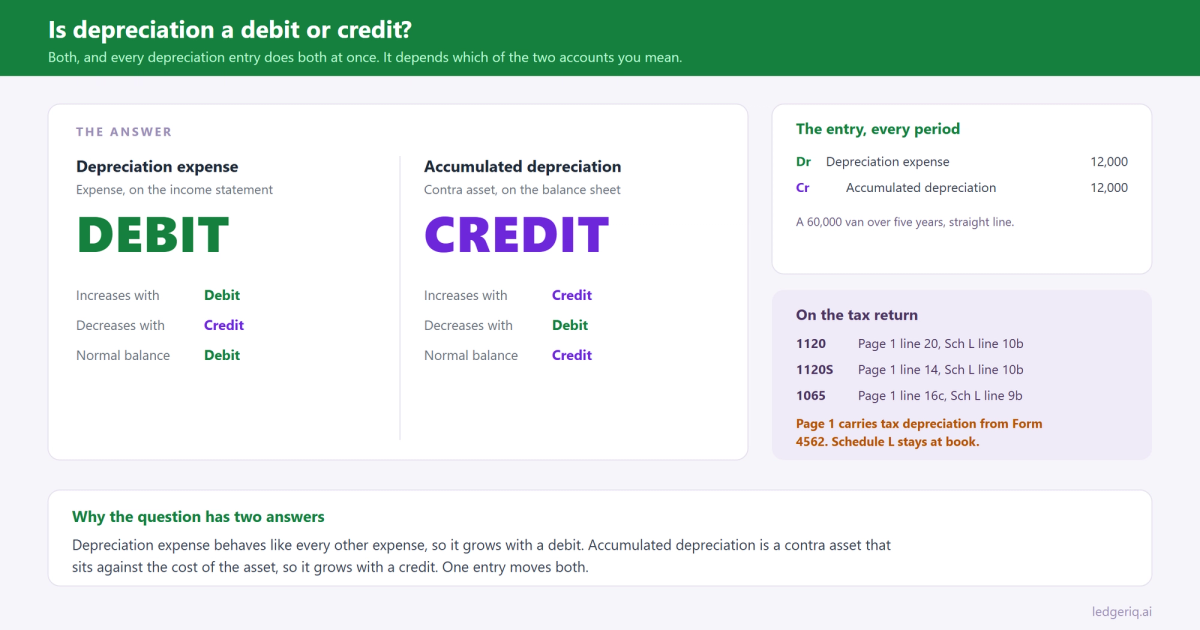

Depreciation is both a debit and a credit, depending on which account you mean. Depreciation expense is a debit: it increases with a debit and carries a normal debit balance. Accumulated depreciation is a credit: it is a contra asset that increases with a credit and carries a normal credit balance. Every depreciation entry debits the first and credits the second.
So if you are asking "to increase depreciation, is it a debit or credit", the honest answer is: both, in the same entry, by the same amount.
The short answer
Depreciation expense. Increases with a debit. Decreases with a credit. Normal balance is a debit. It lives on the income statement and closes to retained earnings at year end.
Accumulated depreciation. Increases with a credit. Decreases with a debit. Normal balance is a credit. It lives on the balance sheet, directly under the asset it belongs to, and it never closes.
Why it works that way
Start with the rule that runs everything. Assets and expenses increase with debits. Liabilities, equity and revenue increase with credits.
Depreciation expense is an expense, so it follows the expense rule. Nothing unusual.
Accumulated depreciation is the one that trips people, because it sits in the asset section of the balance sheet and still carries a credit balance. That is what a contra account is: an account that lives next to another account and runs in the opposite direction, so that the two together show a net figure.
A van cost 60,000. After two years, 24,000 of that cost has been used up. You could reduce the Vehicles account directly, but then the balance sheet would forget what the van originally cost. Instead, cost stays at 60,000 as a debit, accumulated depreciation grows to 24,000 as a credit, and the net book value of 36,000 is the difference. Both numbers survive, and anyone reading the balance sheet can see how old the asset is.
Journal entries, with numbers
Recording a year of depreciation. A 60,000 van, five year life, straight line, no salvage value.
- Debit Depreciation expense 12,000
- Credit Accumulated depreciation, vehicles 12,000
Monthly, it is the same entry at 1,000.
Selling the asset for a gain. Four years in, accumulated depreciation is 48,000, so net book value is 12,000. The van sells for 15,000.
- Debit Cash 15,000
- Debit Accumulated depreciation, vehicles 48,000
- Credit Vehicles 60,000
- Credit Gain on sale of asset 3,000
This is where accumulated depreciation decreases with a debit. Both the cost and its accumulated depreciation come off the books together. Leave either one behind and the balance sheet carries a ghost.
Scrapping a fully depreciated asset. An 8,000 computer, fully depreciated, thrown away.
- Debit Accumulated depreciation, equipment 8,000
- Credit Equipment 8,000
No gain, no loss, no cash. Just two balances cleared that had been describing something that no longer exists.
Correcting an overstatement in the current year. Depreciation was booked at 13,500 instead of 12,000.
- Debit Accumulated depreciation 1,500
- Credit Depreciation expense 1,500
If the error was in a closed prior year, the expense side goes to retained earnings instead, because that expense has already closed.
How it looks on a trial balance export
On a trial balance exported with separate debit and credit columns, which is the QuickBooks default, depreciation expense appears in the debit column and accumulated depreciation appears in the credit column. Clean.
On an export with a single balance column, credits usually print as negative numbers, so accumulated depreciation shows as something like -48,000, sometimes in parentheses. That is correct, not an error. It is a credit balance expressed as a sign.
The version that is an error: accumulated depreciation showing as a positive number in a signed export, or in the debit column. That means somebody posted the depreciation entry backwards, or netted accumulated depreciation into the asset account and then kept going. Either way, fix it before the balance sheet goes anywhere near a return.
Where it goes on the tax return
Depreciation expense lands on page 1: line 20 of Form 1120, line 14 of Form 1120S, line 16c of Form 1065. Depreciation that belongs in cost of goods sold goes on Form 1125-A instead.
One catch. The page 1 figure is tax depreciation from Form 4562, not the book depreciation expense in the ledger. They differ almost every year, and the difference goes on Schedule M-1. We explain which direction in book vs tax depreciation.
Accumulated depreciation lands on Schedule L: line 10b on Forms 1120 and 1120S, line 9b on Form 1065, directly under the depreciable assets on 10a or 9a. It stays at the book figure, not the running total from the tax depreciation schedule. If you want to reconcile the two records, Form 4562 and the trial balance walks through it.
Mistakes that throw it off
Netting accumulated depreciation into the asset. One account called "Vehicles, net" with a single balance. The trial balance still balances, but Schedule L wants cost on one line and accumulated depreciation on the next, and there is no way to split them without going back to the depreciation schedule.
Posting the entry backwards. Credit expense, debit accumulated depreciation. Net income goes up instead of down, and accumulated depreciation turns into a debit balance on the asset side. It usually shows up as a contra account with the wrong sign.
Disposing of the asset and forgetting the accumulated depreciation. The cost comes off, the accumulated depreciation stays, and the balance sheet now carries a credit balance against nothing.
Booking tax depreciation into the books. It feels tidy, because then book and tax agree. But the financial statements now show MACRS depreciation, and the M-1 no longer documents the difference it exists to explain.
Depreciation hiding in cost of goods sold. Manufacturing depreciation belongs in cost of goods sold, and administrative depreciation belongs on page 1. Code them to one account and one of those two lines is overstated.
Where Ledger IQ fits
Upload a trial balance to Ledger IQ and the parser reads it whether the export uses debit and credit columns or a single signed balance, including negatives in parentheses. Accumulated depreciation arrives as the credit it is, and the totals row shows immediately whether the file balances.
Depreciation expense and accumulated depreciation each map to their own named return line. Because the tax software computes depreciation from its own asset module, Ledger IQ marks both as not exported: they appear in your workpaper so it ties and the book figures are documented, and they stay out of the import file so they cannot double up with the asset module. The book to tax difference goes in as a tax journal entry, visible on the Working Trial Balance as its own line rather than a plug.
Ledger IQ supports Forms 1065, 1120S and 1120, with exports for Drake, Lacerte and UltraTax CS. It is free during early access, so you can try it at portal.ledgeriq.ai on a live client without a credit card.