Part of our guide to Trial Balance Software for Tax Preparation: 7 Options Compared.
Partway down the Schedule B questions on Form 1065 there is a question that decides how much work the rest of the return takes. It asks whether the partnership satisfies all four of a set of conditions, the two that matter most being total receipts under $250,000 and total assets under $1 million at year end.
Answer yes, and Schedules L, M-1 and M-2 are not required. The balance sheet, the book-to-tax reconciliation, and the analysis of partners' capital all become optional.
For a lot of small partnerships the honest answer is yes. The more interesting question is whether you should complete them anyway.
What the relief actually covers
The exception removes the requirement to *file* those schedules. It does not remove the requirement to keep books, and it does not remove the partner capital account reporting on each K-1, Item L still has to be completed on tax basis regardless.
That is worth pausing on, because it undercuts most of the time savings. You still need to know each partner's beginning capital, their share of income, their distributions and their ending capital. You are doing the capital account work either way. What you skip is the partnership-level balance sheet and the M-1 reconciliation.
The case for completing them anyway
Continuity. The most common reason a partnership return is painful is that the prior year's balance sheet is blank. When the partnership crosses the threshold (a good year, an equipment purchase, a capital contribution), you suddenly need a beginning column, and there is nothing to carry forward. Reconstructing beginning balances several years later, potentially for partners who have since changed, is dramatically harder than maintaining them annually.
It is a control, not just a disclosure. A balance sheet that ties is evidence the return is internally consistent. Without it, an error in the income statement has nothing to bump against. With it, the fact that assets equal liabilities plus capital tells you the income you reported and the equity you reported agree with each other.
Clients and lenders look at it. A partnership seeking financing will be asked for returns, and a return with a blank balance sheet looks like less of a document than one without.
The prior preparer's choice sets the expectation. If last year's return included Schedules L, M-1 and M-2, the client has seen them. Dropping them this year is a visible change you will be asked about.
The practical answer most firms land on: if the client's books are good enough to produce a balance sheet, complete the schedules. If the books are a shoebox and the partnership genuinely qualifies for the exception, take the exception and be honest about the answer.
Answering the question honestly
The question is a representation on a signed return. Answering yes to avoid the work when the partnership does not qualify is not a shortcut. It is a misstatement, and the thresholds are the kind of thing that is easy to check against the return itself.
Worth noting: it is the *total receipts* figure, not net income, and *total assets* at year end. A partnership with $180,000 of net income can easily have $600,000 of receipts.
Making the schedules print when they are not required
Here is the mechanical part that trips people up. If the partnership qualifies for the exception, the software may not produce Schedules L, M-1 and M-2 even after you have entered the data, because they are not required.
You have to force them to print. In Drake that is a print option inside the return; other packages have an equivalent setting. Until you do, you can enter a complete balance sheet and see nothing in the forms view, which reads like the data did not save.
This matters beyond appearances: a balance sheet you cannot see is a balance sheet you cannot verify. The entire value of completing Schedule L is checking that it ties, and you cannot check what will not display. Force the print before you start entering, not after.
What to verify once they do print
Prior-year ending equals current-year beginning. Every line of the beginning column should match last year's return. This is where the errors that survive e-filing live.
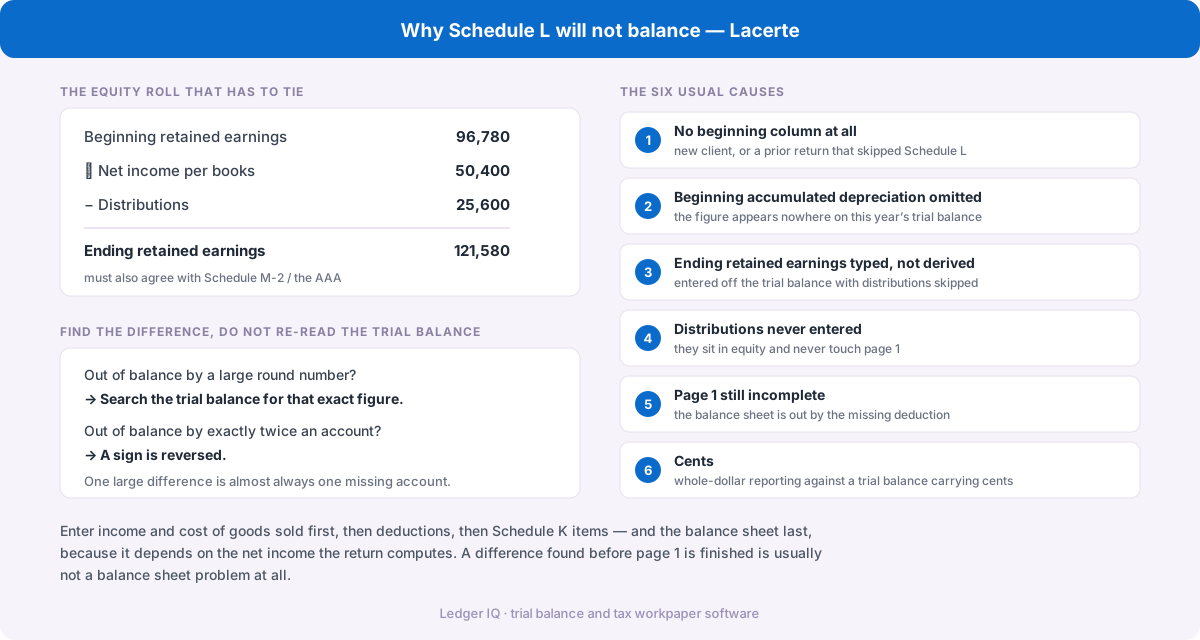
Total assets equal total liabilities plus capital. If not, work through the usual causes, a missing beginning balance, accumulated depreciation left out of the beginning column, distributions not entered, or an income statement that is not finished yet.
Book income on Schedule M-1 ties to the income statement. If the client's books do not include something the return does, this year's amortization is the classic, book income and tax income differ by exactly that amount, and M-1 is where you show it.
Partners' capital on Schedule L agrees with the sum of the partners' Item L capital accounts. Remember these are on different bases: Item L is tax basis, Schedule L follows the client's books. A difference can be correct, but you should be able to name what causes it.
The part that happens before the tax software
Everything above assumes you have a trial balance that foots and a clear view of what is book and what is tax. That is a bigger assumption than it sounds, because the client's books frequently do not include the adjustments the return needs, and the reconciliation between the two is where the time actually goes.
That is the problem Ledger IQ is built for. Upload the client's trial balance, post the adjusting entries the books are missing, and record book-to-tax differences as tax journal entries with dedicated M-1 and M-2 offset rows, so the book column stays intact while the tax difference is tracked separately.
The Working Trial Balance then shows unadjusted, adjustments and adjusted columns side by side, with totals that prove the trial balance still foots after every entry, and a net income figure that is exactly what Schedule M-1 line 1 should say. Prior-year balances can be entered or carried forward, so the beginning column is available whether or not last year's return included one.
Which means the decision about whether to complete Schedule L stops being a question of how much work it is.
Supports Forms 1065, 1120-S and 1120, with exports for Drake, Lacerte and UltraTax CS. The Drake walkthrough is in the Drake Tax resource guide.